
There’s a moment in every project where things start slipping.
Tests are being executed… but no one is fully sure:
-
what was tested
-
what’s still pending
-
what failed yesterday vs today
-
or whether we’re actually ready to release
I’ve seen this many times.
Not because teams lack skill.
But because they lack structure.
That’s where Azure Test Plans comes in.
What Azure Test Plans really is (beyond the definition)
Azure Test Plans is not just a place to “store test cases.”
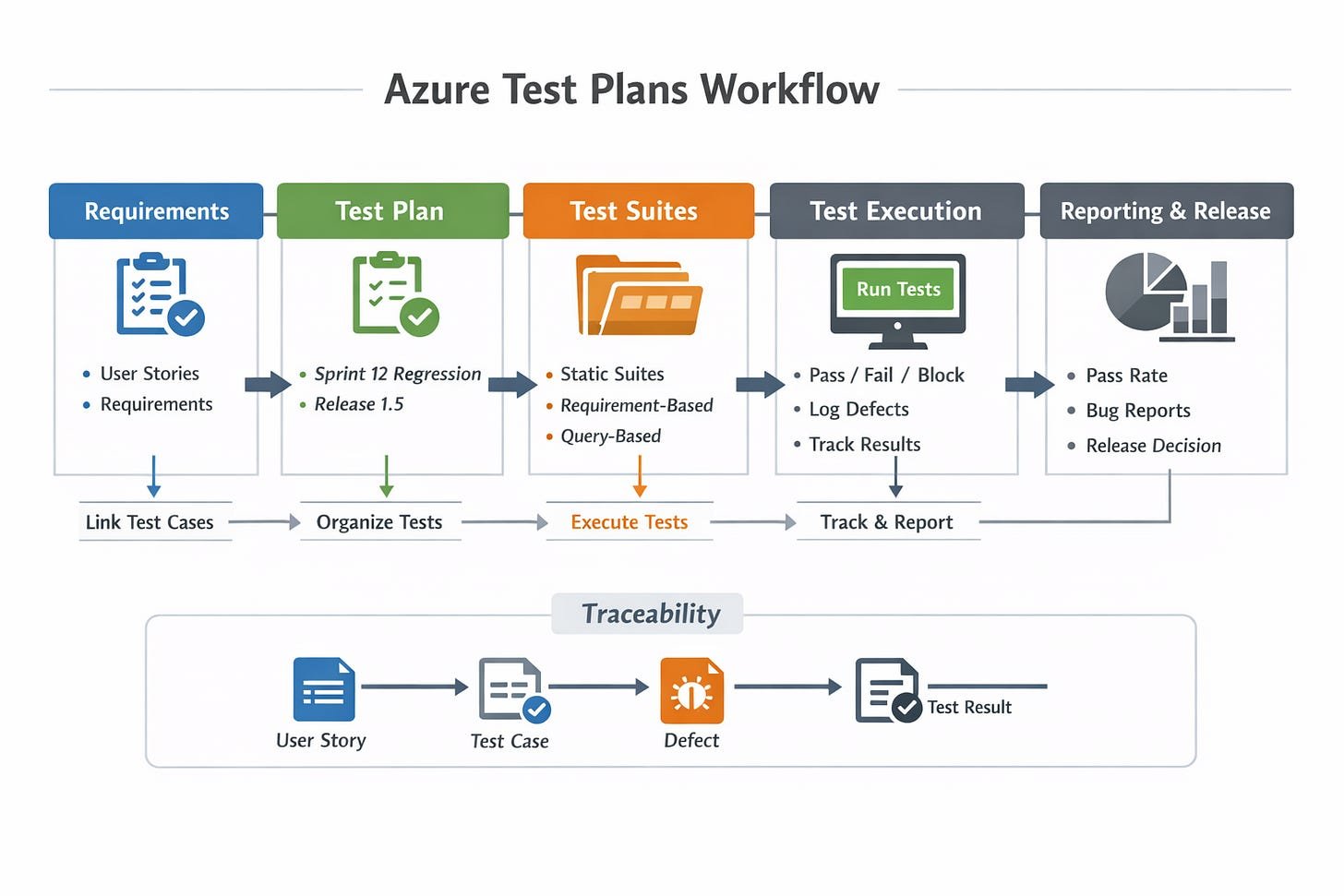
It’s a centralized system to control quality across:
-
test cases
-
test execution
-
traceability
-
reporting
-
releases
Think of it as the control tower for QA.
Everything flows through it:
-
requirements → test cases
-
test cases → executions
-
executions → defects
-
defects → release decisions
The core components (simple and practical)
1. Test Plans
A Test Plan = a release or sprint scope
Example:
-
Sprint 12 Regression
-
Release 1.5 Validation
👉 This is where you define what you’re validating
2. Test Suites
Organized containers inside a Test Plan.
Types:
-
Static suites (manual grouping)
-
Requirement-based suites (linked to backlog items)
-
Query-based suites (dynamic via filters)
👉 This is where structure starts to matter
3. Test Cases
Each test case includes:
-
Steps
-
Expected results
-
Preconditions
-
Attachments
-
Parameters (for data-driven testing)
👉 This is your single source of truth
4. Test Runs & Execution
This is where real QA happens.
You:
-
execute tests
-
mark Pass / Fail / Blocked
-
log bugs directly
👉 Everything is tracked automatically
5. Traceability (This is HUGE)
This is where Azure Test Plans shines.
You can link:
-
User Story → Test Case → Test Result → Bug
So when someone asks:
“What was tested for this feature?”
You don’t guess.
You show it.
How a real QA workflow looks like
Here’s a simple, senior-level flow you can explain in interviews:
-
Requirements are created in Azure Boards
-
Test cases are linked to requirements
-
Test Plan is created for the release
-
Test Suites organize coverage
-
QA executes tests during the sprint
-
Bugs are logged directly from failed steps
-
Reports show progress, pass rate, and gaps
-
Release decision is based on real data
👉 This is test governance in practice
Why companies like Azure Test Plans
From a Test Manager perspective:
✅ Full traceability (audit-ready)
Everything is linked and versioned.
✅ Built-in reporting
-
Pass rate
-
Fail trends
-
Execution progress
✅ Integration with DevOps
No tool switching:
-
Boards (requirements)
-
Repos (code)
-
Pipelines (CI/CD)
-
Test Plans (QA)
✅ Supports manual + automation
You can:
-
track manual tests
-
integrate automated results
Where people struggle (real talk)
Azure Test Plans is powerful… but not always simple.
Common issues:
-
Overcomplicated suite structure
-
Poorly written test cases
-
No clear ownership
-
Treating it as “just documentation”
And the biggest mistake:
Using the tool without defining a process
How I approach it (practical mindset)
When I use Azure Test Plans, I focus on:
1. Keep structure simple
-
Don’t over-engineer suites
-
Align with features or flows
2. Write test cases for clarity, not volume
-
Clear steps
-
Clear expected results
-
Easy to execute
3. Enforce traceability
Every test must answer:
👉 “What requirement does this validate?”
4. Make results meaningful
Execution is not just clicking “Pass”
It’s:
-
validating behavior
-
identifying risks
-
supporting release decisions
The real value (what most people miss)
Azure Test Plans is not about test cases.
It’s about confidence.
Confidence that:
-
what needed to be tested → was tested
-
what failed → is visible
-
what is risky → is known
And when you reach release day…
You’re not guessing.
You’re making a data-driven decision.
Final thought
Tools don’t improve quality.
Clarity does. Structure does. Discipline does.
Azure Test Plans simply provide the environment to apply them at scale.
If used right, it doesn’t just organize testing.
It elevates how your team thinks about quality.